We Help Enterprises Deploy AI.

KNOWNE helps enterprises build AI capability — on their own data and workflows, powered by the platform we build and run ourselves.

Our Approach

We Help Enterprises Build AI Capability.

From strategy planning to system deployment, we guide enterprises into AI-driven operations.

AI strategy consulting & assessment
Custom AI agent development
Workflow design & system integration
AI management, training & governance

End-to-end AI transformation partner.

The Difference

The work already has rules. The question is who does it.

Done by people today

  • Someone digs through catalogues, spreadsheets and chat groups to answer the same question again
  • Documents are keyed in by hand, then checked line by line
  • Renewals and deadlines live in a spreadsheet, or in one person's head
  • When the one person who knows is away, everything waits
KNOWNE

Handed to an assistant

  • Answers come from your own documents, with the source attached
  • A photo of a document becomes a record, checked against stock
  • Deadlines are watched on a schedule and raised before they bite
  • What only one person knew is written down, and stays

Every one of these has rules, and data you can look up.

Services

What We Do

From 0 to 1, we build AI organizations that actually work.

Core

AI Employee Deployment

Make AI a member of your company.

  • Build AI Agents (CS / Admin / Ops)
  • Workflow design (Task → Decision → Action)
  • Integrate ERP / CRM / Docs / Comms
  • Continuous optimization & operation

AI starts taking over real work.

Custom AI Agent System

Build your own AI team.

Customer service, document processing, report generation, multi-agent collaboration. From single AI to AI team.

AI Workflow Engineering

Turn your SOP into AI-executable workflows.

Turn your SOP into AI-executable flows. Task decomposition, decision logic, triggers, human-AI hybrid workflows.

AI Management & Governance

Make AI controllable, manageable, measurable.

Task monitoring, access control, AI KPI tracking. From using AI to managing AI.

Enterprise AI Training

From users to designers.

Not teaching tools — teaching how to run a company with AI.

Use Cases

Where it actually earns its keep

Six situations most companies will recognise. Each one is a scenario we can walk through end to end.

Every industry

The one person who knows takes leave

Can this model be used here? Did that customer have a special discount? Where does a new technician start? Everything waits for them to come back.

The moment they answer, it is captured. The next person to ask the same question does not have to wait for anyone.

Show me this one

Companies with a sales team

The customer replies "we'll think about it"

Is it the price, or are they waiting on someone else's quote? Answer that wrong once and the deal is gone.

From past orders and conversations it flags what this customer actually cares about and offers a few ways to reply. Sending it is still the salesperson's call.

Show me this one

Where people need certification

Nobody remembers the certificate expiring

A spreadsheet on somebody's machine, the originals in a drawer, and the expiry usually discovered when an auditor asks.

Checked daily, with the person and their manager told before it lapses. When an audit asks for the record as it stood, it is there.

Show me this one

Companies with legacy systems

That old system with no API

Fifteen years old, the vendor may no longer exist, and everyone uses it daily. Integrating means replacing the whole thing first.

It opens the web page like a person would to fill forms, send replies and pull data, checking the content before anything leaves. The old system stays.

Show me this one

Companies with a site and product content

Customers now ask AI for suppliers

They ask an AI who to go to, and the answer names three of your competitors — not you.

Turns your existing material into something an AI can actually read, publishes on a schedule, and checks back whether you are being cited yet.

Show me this one

Warehouses and shop floors

The screen nobody updates

Still showing a notice from three months ago. Everyone walks past it; nobody changes it.

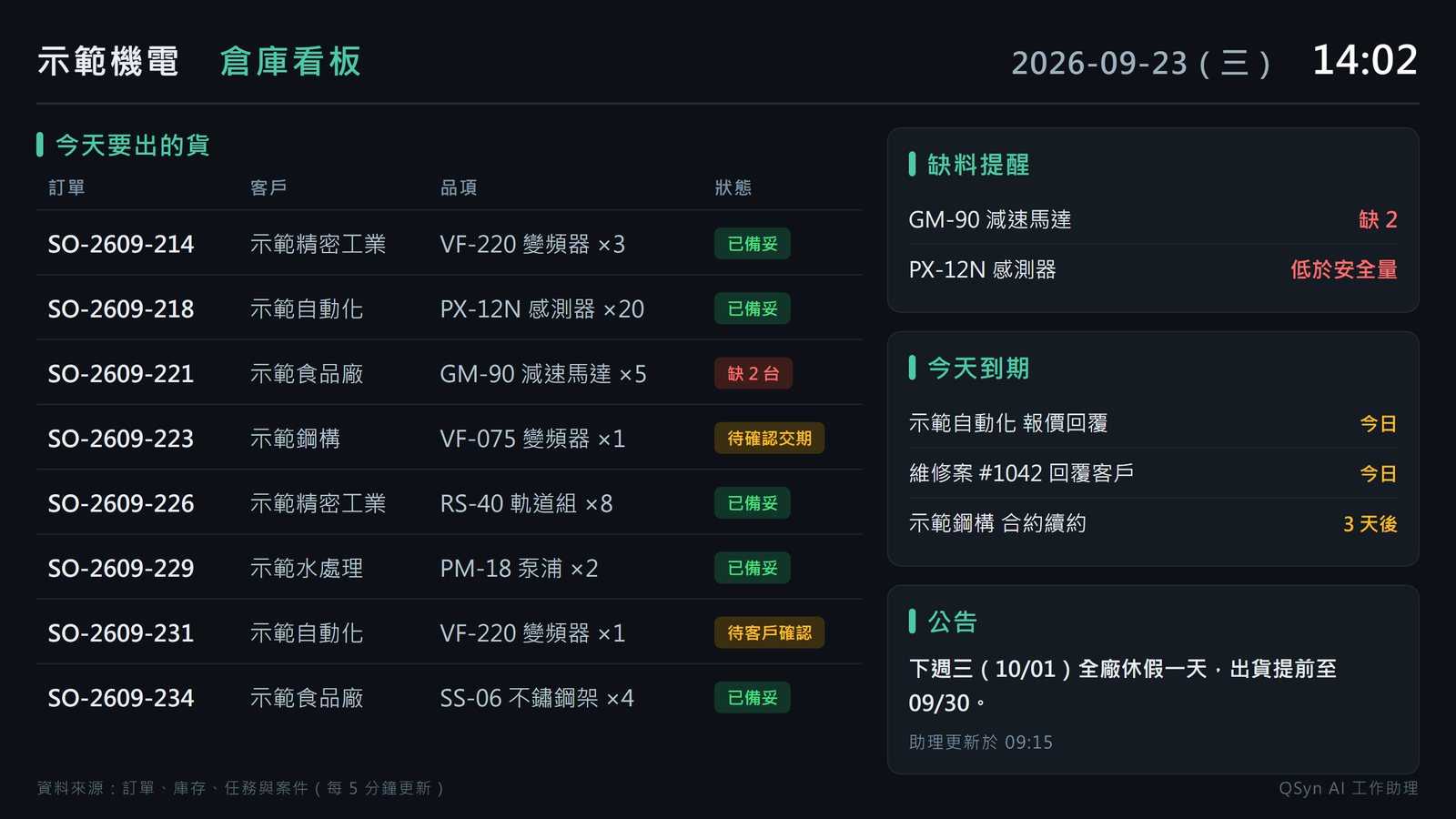
Shows what ships today, what is short and what falls due, updating itself as the data changes — and a single sentence is enough to change it.

Show me this one

In these situations AI is not an assistant — it is the one doing the work.

Which of these is your company?

Tell us which situation, and we will walk it through end to end on your own data — not on sample data.

Tell us your situation

Deployments

Applications Across Industries

Screens are the real systems; company names and data are masked.
Automation equipment

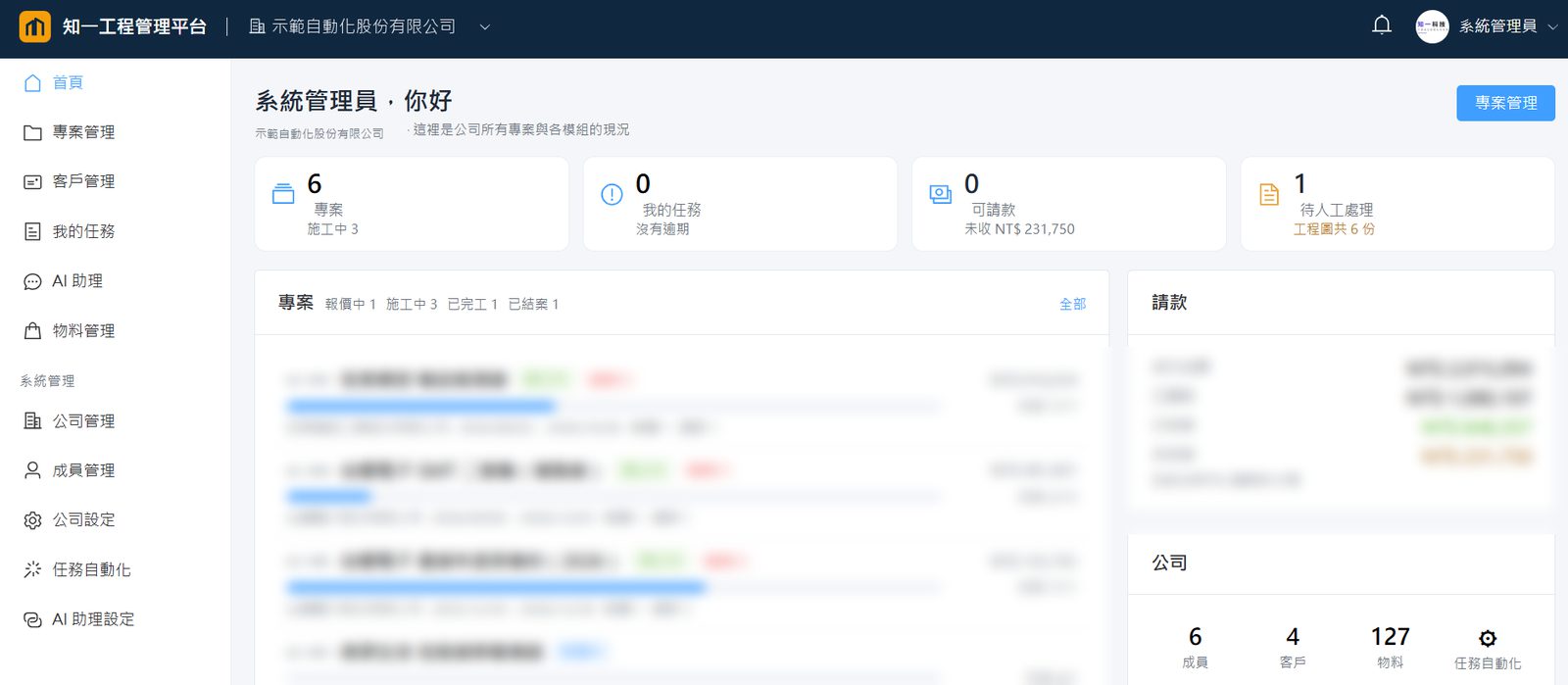
Project & contract management

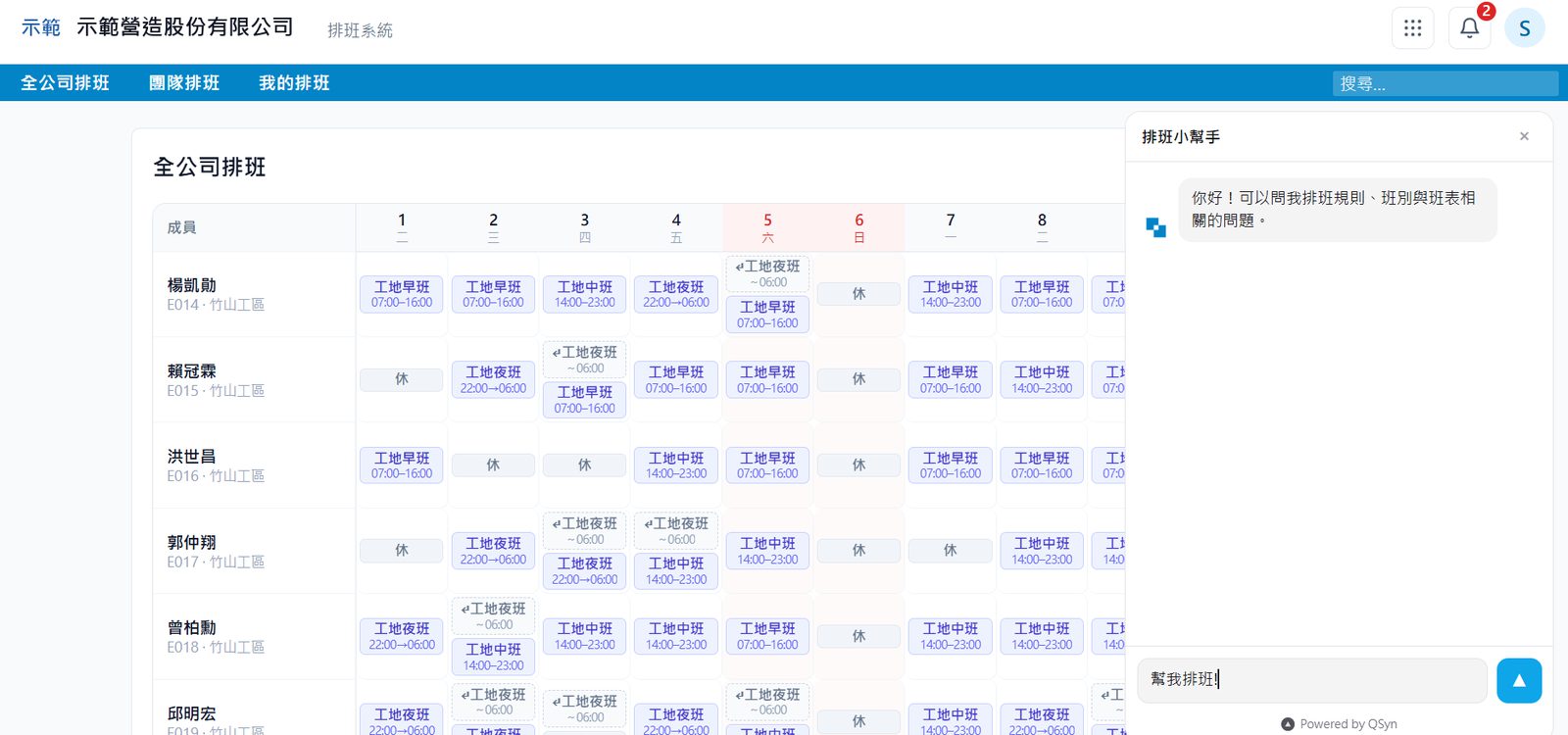
Quotations, site work, progress and billing in one system. The sidebar carries "AI assistant" and "AI assistant settings" as first-class features — the agent works inside the system, on the same permissions as the people.
Construction

Internal company management

HR, leave, payroll, approvals, purchasing and materials. Staff ask about shifts and leave in plain language; the assistant can draft the roster itself.
Manufacturing

R&D management

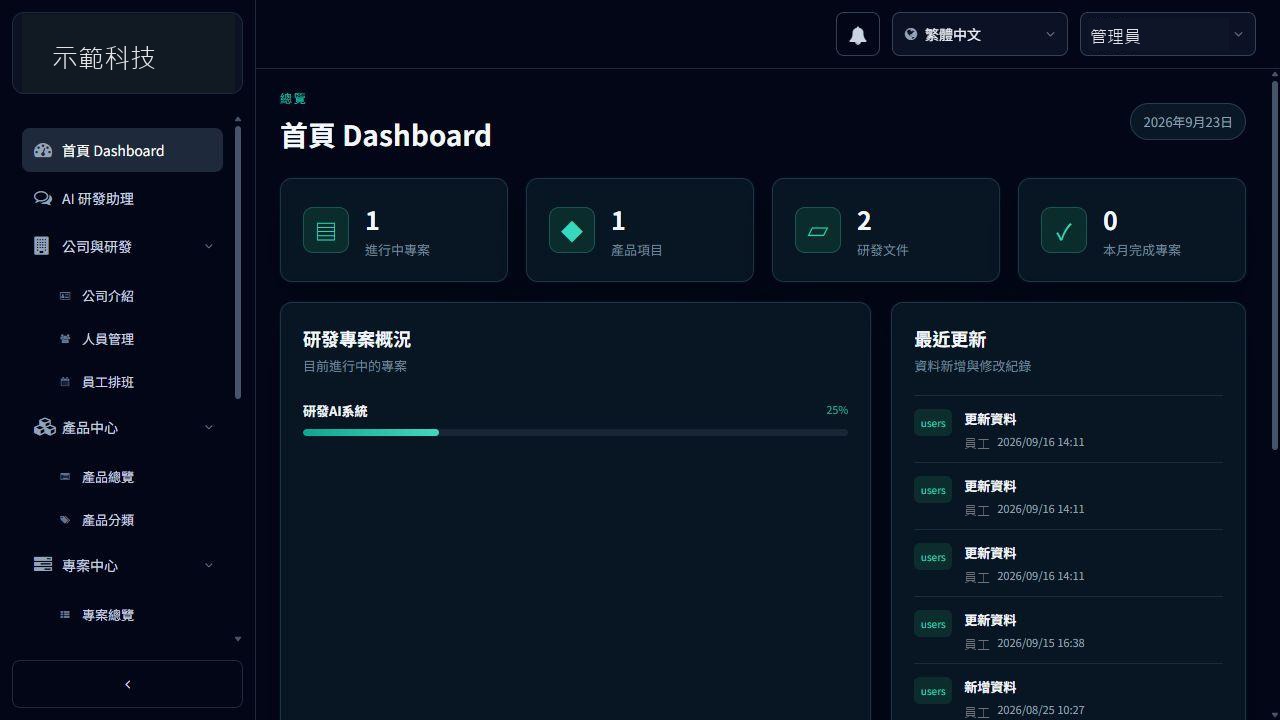
Products and projects, people and shifts, a document centre, with an R&D assistant built in. The data stays in the system, not on someone's laptop.
Equipment service

After-sales service

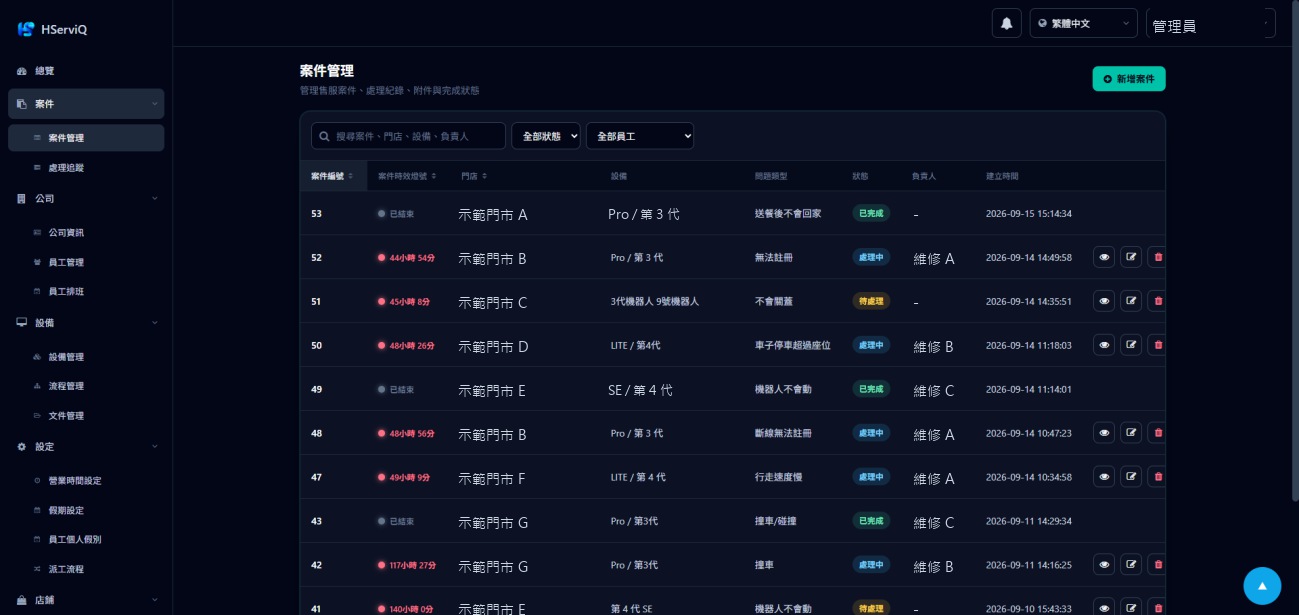
Complaints and repair cases from intake to close-out; support, managers and technicians each see the part that concerns them.
IoT · Hardware

Connected asset tracker

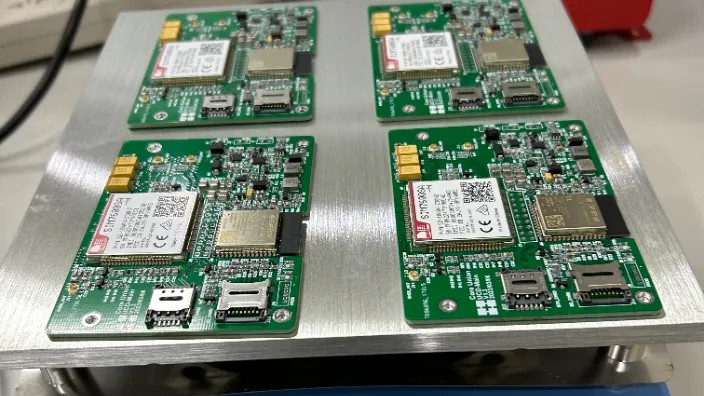
4G, GPS, Bluetooth and image capture integrated on a single control board, with a mobile app, backend services and geofence alerting. Developed end to end, from circuit design and embedded firmware through to the cloud service.

IoT · Hardware

Automated irrigation & monitoring

A master–slave control architecture combining environmental sensing with scheduled irrigation, plus iOS/Android apps and server-side management. Hardware, firmware, backend and applications all developed in house.

Phased rollout

Start with the one task that costs the most time; existing work carries on uninterrupted.

One team throughout

Custom systems, AI deployment consulting and training - and the maintenance afterwards.
In practice

What it looks like on an ordinary day

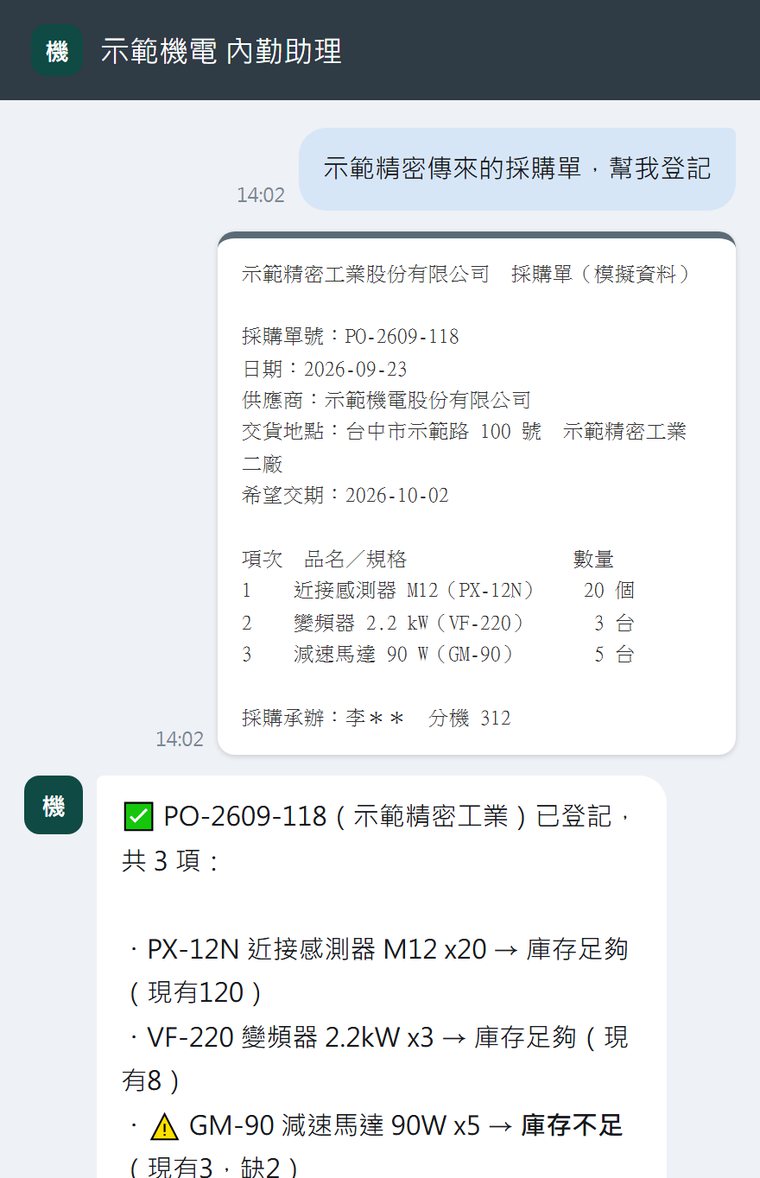
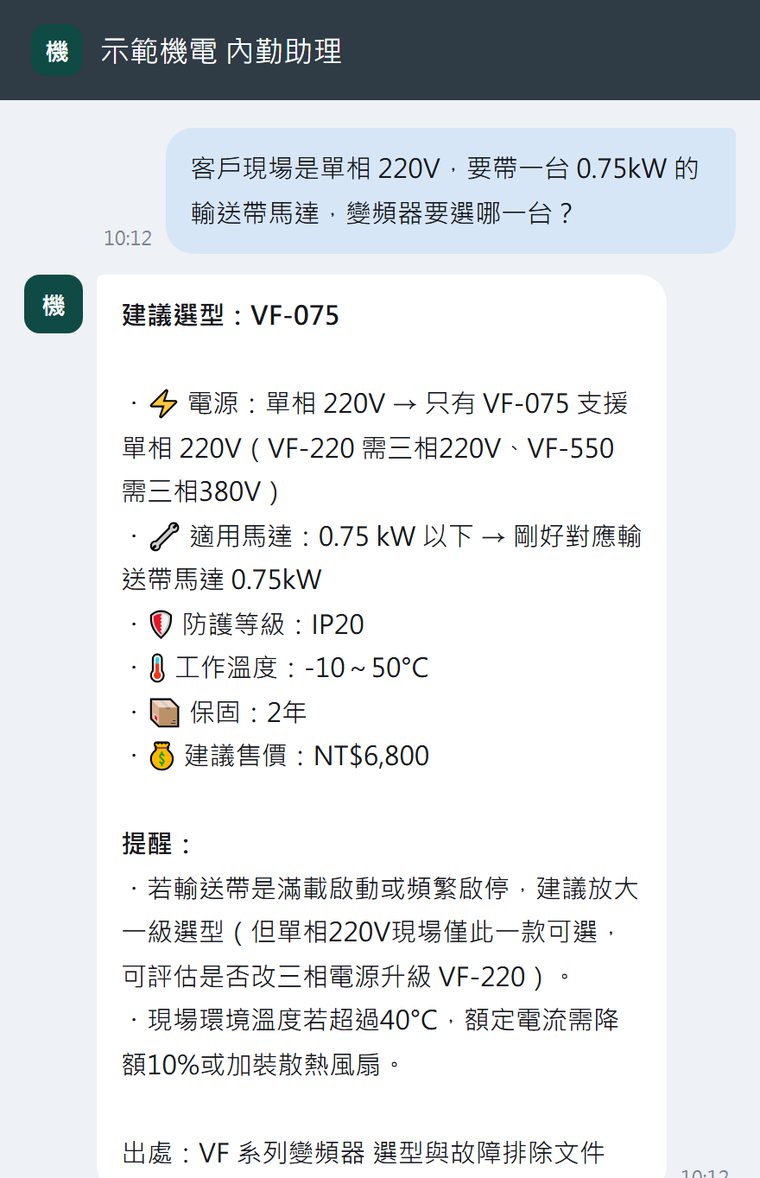
Staff use the messaging app they already have - nothing new to install, no commands to memorise. Illustrations below, using sample data.

Asked for a spec, on the spot

It reads the company's own documents, explains why that model and not another, and names the document it used.

Photograph the document, it files itself

Items and quantities are read off the photo, checked against stock, and written into the system - shortfalls flagged for a person.

Nobody has to remember the deadline

Contracts, warranties and certificates are watched on a schedule; the owner is told before it matters, not after.

The screen on the office wall, too

What ships today, what is short, what falls due - on a screen everyone walks past. Unlike a normal digital sign, the assistant can reach everything on it and change it as the data changes. Any screen that opens a browser will do.

Illustration, using sample data.

But we don't just do consulting.

We build and run our own AI products.

Our Products

We don't just advise. We deliver systems that run.

Multiple systems running in production give us a deep technical base: knowledge graphs, permission-scoped access, scheduling and tool use, delivery across web and mobile — all proven under real load. But what makes a deployment hard is never the base. It is the integration: your data, your permissions, your ERP and CRM, the systems and habits your company already runs on. That is exactly what we are good at, and it is the work we do with you.

Flagship platform

QSyn

Enterprise knowledge platform · Knowledge graph & RAG

Live

Turns your documents, data and systems into a knowledge graph a question can actually search across — knowledge bases, wikis, data tables, pipelines and tool-using agents, all behind one API.

Enterprise value: The foundation we deploy on. Answers are grounded in your own knowledge and stay inside each employee's existing permissions.

Visit

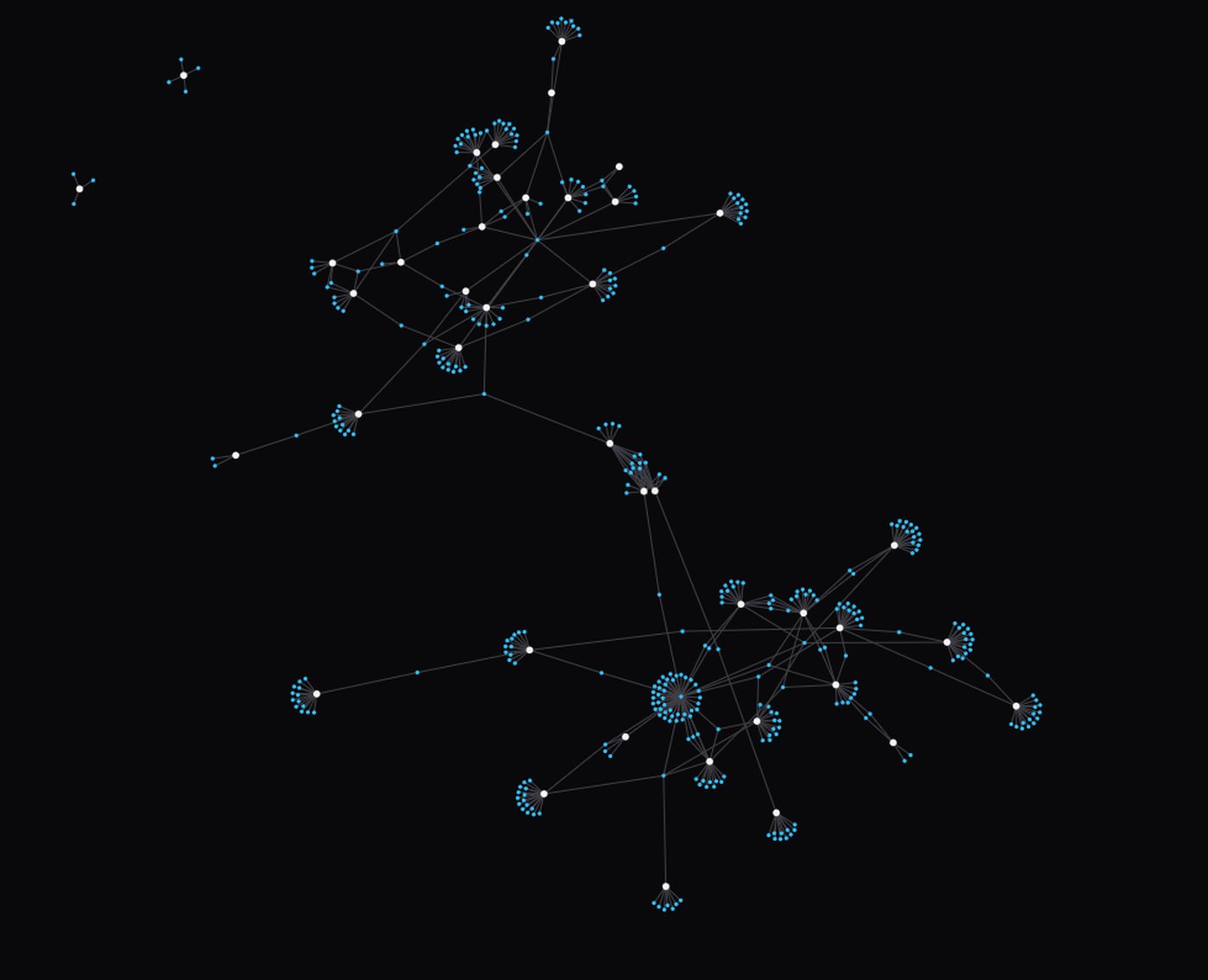
A knowledge graph, not a pile of documents

Documents go in as they are; what comes out is the people, parts, orders and cases inside them and how they connect. That is why "is this related to that?" is a question the system can answer at all.

DYNARA

AI employee platform · Roles, memory, schedules, tools

Enterprise deployment

An AI employee that holds a role, remembers your company and your preferences, works to a schedule, and uses tools to get things done — a management console, a mobile app and an API around it.

Enterprise value: This is what "hiring" AI looks like in practice: a colleague with a job description, not a chat window someone has to remember to open.

Company Info System

HR & operations · AI assistant built in

Bespoke

Attendance, payroll, leave, overtime and an employee directory — with an AI assistant of our own that operates the whole system through natural language, strictly within each user's permissions.

Enterprise value: Deploy it as it is, or have us fit it to how your company actually runs. A working reference for what an AI-operated internal system looks like.

Signal

Built on QSyn · iOS & Android

Live · Beta

You describe the conditions you care about in plain language; a QSyn pipeline turns them into rules, evaluates them on a schedule and pushes an alert the moment one matches — with its reasoning attached.

Enterprise value: Proof of how fast this path is. Signal runs no AI infrastructure of its own — it calls QSyn. That is the same route we take to get your system into production in weeks, not quarters.

Riddle

Multi-platform AI application · Web, iOS & Android

Live

A drawing canvas you write or speak into, and the AI reads your ink, thinks, and answers. Notebooks, memory and metered usage are built in.

Enterprise value: Evidence we ship and operate real applications across web and mobile — including the unglamorous parts: accounts, billing, metering and support.

Consulting, our own platform, and custom development — delivered by one team.

Common question

Why not just use ChatGPT?

Three options side by side. The difference is not which one is smarter.

What it knows
Using ChatGPT yourselfWhatever is on the public web. Not your company.
Asking your vendor to add AIThe handful of fields you expose to it.
ThisYour documents, tables and correspondence — no tidying up required first.
When it is wrong
Using ChatGPT yourselfIt produces a plausible answer, and you will not know.
Asking your vendor to add AIIf the field is empty, the answer is empty. It will not say why.
ThisEvery claim carries its source; when it cannot find one, it says so.
Data access
Using ChatGPT yourselfThe moment it is pasted in, it has left the building.
Asking your vendor to add AIUsually one shared account reading everything, identical for every asker.
ThisThe same permissions each employee already has; anything not opened up cannot be read, and never appears in an answer.
Can it act — and where
Using ChatGPT yourselfNo. It hands you text; a person still does the work.
Asking your vendor to add AIYes, but only inside that one system — nowhere else can reach it.
ThisCreate records, dispatch work, send reminders, drive web systems. And not only from a console — ask from a phone or a messaging app and it acts.
Judgement nobody wrote down
Using ChatGPT yourselfIt has no idea — that knowledge was never published.
Asking your vendor to add AIThere is no field it fits in.
ThisSomeone asks, the veteran answers, and it is captured at that moment.
A year later
Using ChatGPT yourselfUnchanged. It does not remember your company.
Asking your vendor to add AIUnchanged, unless you commission the next release.
ThisIt keeps learning — closer each month to how your people actually phrase things.

These are not mutually exclusive. Work with clear rules that repeats every day still belongs in a system — we build those too; and ChatGPT is genuinely useful for thinking. This table is about the other half: your own knowledge and processes, and who should hold them.

Not sure where to start?

Leave your contact details and a line about how things work today. We will come back with the three things worth doing first, and roughly how long each takes.

Tell me what to do first

Coverage

From the equipment to the phone, one system

Where the data is produced, where the system runs, and who uses it on what device — three decisions, made separately.

Equipment & floor

Sensors, controllers, PLCs, production equipment and floor displays.

Modbus · CAN · RS-485 · MQTT

Where it runs

Installed entirely on your own servers, or deployed on AWS. The features are identical; what differs is where the data sits and who operates it.

On-premise · AWS

Where people use it

Browser, desktop app, mobile app — and the messaging app your staff already use.

Web · Windows / macOS / Linux · Android / iOS

AIoT integration

Sensor, controller and gateway data to the cloud, and control commands back down — the state on the floor and the data in the system are the same record.

Warehouse integration

Receiving, locations, stocktakes and picking, connected to your existing WMS or ERP. Shortfalls and expiries are reconciled by the system itself.

Robotics integration

Task dispatch, traffic management and status reporting for AGV/AMR fleets, arms and line equipment.

All three are carried by one team — you do not need an equipment vendor, a systems vendor and an app developer for a single system.

Data & permissions

Layered access, fully auditable

You decide what it can see and what it can act on; what it did is recorded entry by entry.

Layered by sensitivity

Public (catalogues, specifications, policies), internal (orders, stock, contracts) and confidential (cost, HR, payroll) are kept separate. A layer that is not included cannot be read, and never surfaces in an answer.

Per assistant, per person

Each assistant's knowledge bases and tables are configured separately, and scope can be narrowed by who is asking. Permissions follow staff changes immediately.

Read-only by default

A new table is query-only. Insert, update and delete are enabled one at a time; an operation that is not enabled is not even offered to the assistant.

Hard limits on what goes public

A publicly exposed assistant may only use classified tools; destructive and configuration tools can never be published. Settings are admin-only, and every change is stored with its before and after.

Entry-by-entry change history

Every insert, update and delete records who did it, when, and what the row said before — including changes made by agents and the API. Available directly at audit time.

Questions and sources are kept

Who asked what, which data the assistant consulted and which articles it cited are retained entry by entry, for internal audit and later review.

Deployable in the cloud, or installed entirely on your own servers.

Team

It gets built because these sit in one team

One project — from survey through build and go-live to the adjustments afterwards — carried by the same people.

Architecture & backend

Data models, APIs, permissions and deployment.

Embedded & floor integration

Equipment, sensors, production lines and existing systems.

Front end & interfaces

Consoles, mobile, and the screen on the wall.

AI & knowledge engineering

Knowledge bases, graphs, agents and tools.

Deployment consulting & training

Survey and data preparation; users and administrators trained separately.

Operations & support

Updates, backups, model upgrades and tuning against real usage.

In most projects these six sit with three or four different vendors. Keeping them in one team is not about the quote — it is that when something breaks, nobody has to establish whose fault it is first.

External partners

Some specialist work is carried by long-standing partners; for you there is still one point of contact.

Government programmes & academia

Experience writing and running SBIR, CITD and Ministry of Digital Affairs / Ministry of Economic Affairs R&D programmes (including as co-principal investigator), and collaborating with university research teams. Where a deployment is eligible for funding, we can handle that side too.

Deployment

Deployment does not end when the software is handed over

Survey, data preparation and training — carried by the same team.

01

Survey & consulting

Map the existing process and data, find what costs the most time and goes wrong most often, and agree what the first phase does — and what it deliberately does not.

02

Getting the data in

Catalogues, specifications, spreadsheets, scans, photographs of paperwork and existing system data all go in. No tidying up required first.

03

Training

Users and administrators trained separately, with a manual and recorded walkthroughs so new starters can pick it up themselves.

04

Phased expansion

Start with the one task that costs the most time; add the next scenario once it is stable. Existing work carries on throughout.

The build, the AI deployment and the training are handled by one team — no coordinating between vendors.

Deployment targets

40%+

Less time spent asking around

No forwarding the question, no waiting for a reply — the answer arrives with its source attached.

30%+

More work done in the same day

Paperwork, reports and repetitive tasks completed by the agent directly.

Halved

Time for a new starter to be useful

Veterans stop being interrupted, and staff turnover costs the business less.

Targets set together during the survey, not a guarantee; the actual figure depends on what the survey finds.

About

About KNOWNE

KNOWNE is a technology company specializing in AI Agent systems, dedicated to making AI the "digital employee" in enterprises.

We don't just develop AI technology — we build AI work systems that actually operate. From strategy to deployment, we help enterprises transition into AI-driven mode.

4+

Systems in production

Taiwan

Headquarters

End-to-end

Build, deploy, maintain

B2B

Market

What costs you the most time?

You do not have to decide what to build first. Tell us which part of the day takes the longest or goes wrong most often, and we will come back with what is worth doing first and roughly how long it takes.